Products | Support | Register | Where to buy | Videos | Heli team | Company  


Flash-Link

Many Spartan products benefit from computer connectivity capabilities for the purpose of modifying their configuration parameters or updating their firmware when improvements are made. To take advantage of these features an optional Flash-Link or Blue-Link interface module is required offering USB or Bluetooth connectivity respectively. In addition to computer connectivity the Bluetooth option can be used with certain PDAs and mobile phones providing a convenient way for editing configuration parameters at the field. Not all of our products support these options; specific information can be found on each product’s own web page.

Flash-Link Requirements
USB1.x or USB2.0 enabled PC running Windows XP or Vista operating system.

Driver Installation
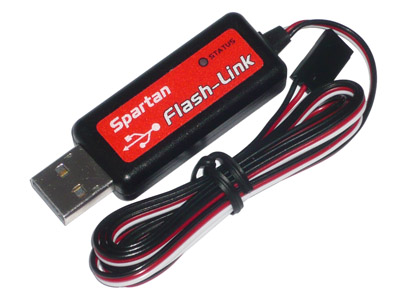
The Flash-Link is an intelligent cable incorporating a USB controller inside the USB plug housing and therefore it requires operating system drivers to function. For a smooth installation ensure that the drivers are already installed before plugging the cable to the computer for the first time. Observe the photos below to identify the correct driver for your Flash-Link.

Any computer software related to the product that you wish to interface to can be downloaded from the the particular product's web page.


Downloads:

See text on the left for drivers and other software.

Product photos:
(click to enlarge)


Drivers for new type Flash-Link with red label.
• Auto Install Driver for Windows Vista.
• Manual Install Driver for Windows XP.


Drivers for old type Flash-Link with blue data plug.
Driver v2.0.2.1 for Win2K/XP/2003 (XP Logo Certified)
Driver v3.2.0.0 for Windows Vista 32bit and 64bit


Drivers for old type Flash-Link with black data plug are build-in Windows update. Use the driver below if Windows fails to locate it.
Flash-Link Win2K/XP/2003 Driver.


  Products | Support | Register | Where to buy | Videos | Heli team | Company
       ©2004-2010 Spartan RC - T&Cs of access.
Home | Contact Us